Go to content
Flowa Beauty
14-day free trial Free trial

Complete management software for your beauty business

Every Flowa Beauty feature, explained clearly.

See exactly how Flowa organises appointments, clients, services, messages, loyalty, online requests and financial tracking for an independent beauty business.

✦ 16 connected features ✓ One plan ↗ Phone, tablet and computer
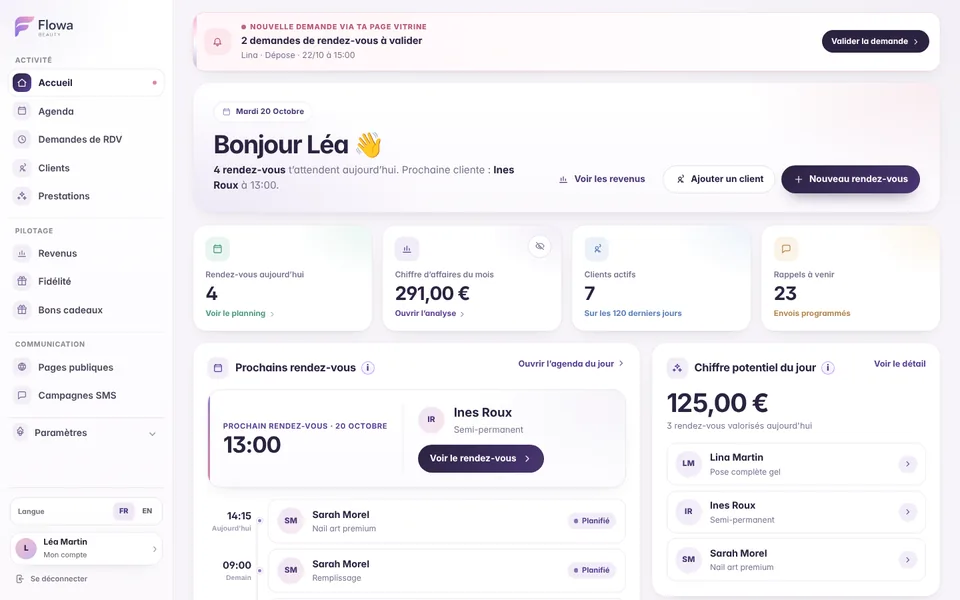
Flowa Beauty dashboard: today’s appointments, revenue and reminders
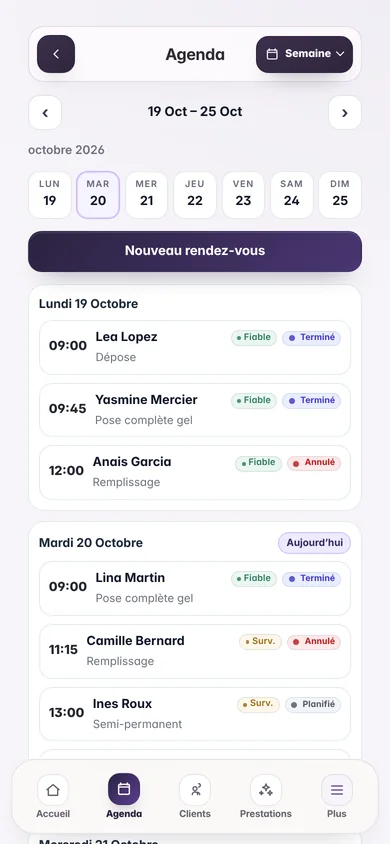
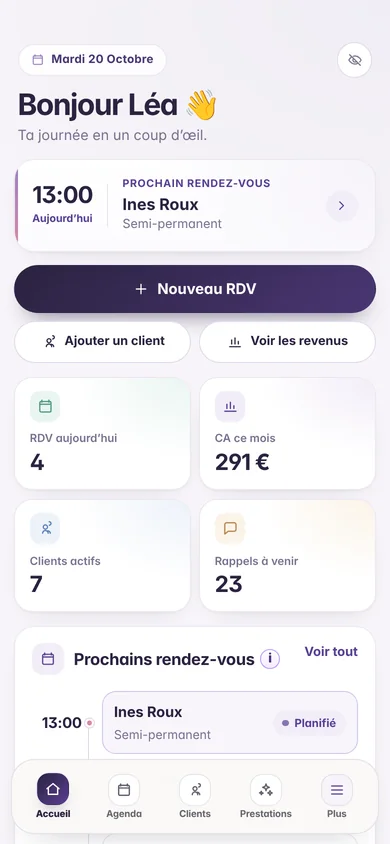
Flowa Beauty dashboard on a phone

Overview

Go straight to the tool you want to explore.

Every feature uses the same appointments and client records, keeping information consistent from one screen to the next.

01

Dashboard

Start the day with the right priorities.

The dashboard brings together today’s appointments, your next client, upcoming reminders, active clients and useful figures. It also highlights anything that needs attention, so you do not have to search through several screens.

  • Next appointment

    See the date, time, client and service you need to prepare.

  • Past appointments to review

    Find finished time slots that still need to be marked as completed, cancelled or no-show.

  • Operational alerts

    See public booking requests to review, loyalty rewards to hand over and low SMS credit.

  • Private business figures

    View recorded or projected revenue and keep your preference to hide those amounts.
02

Calendar and appointments

A professional calendar built around your actual working day.

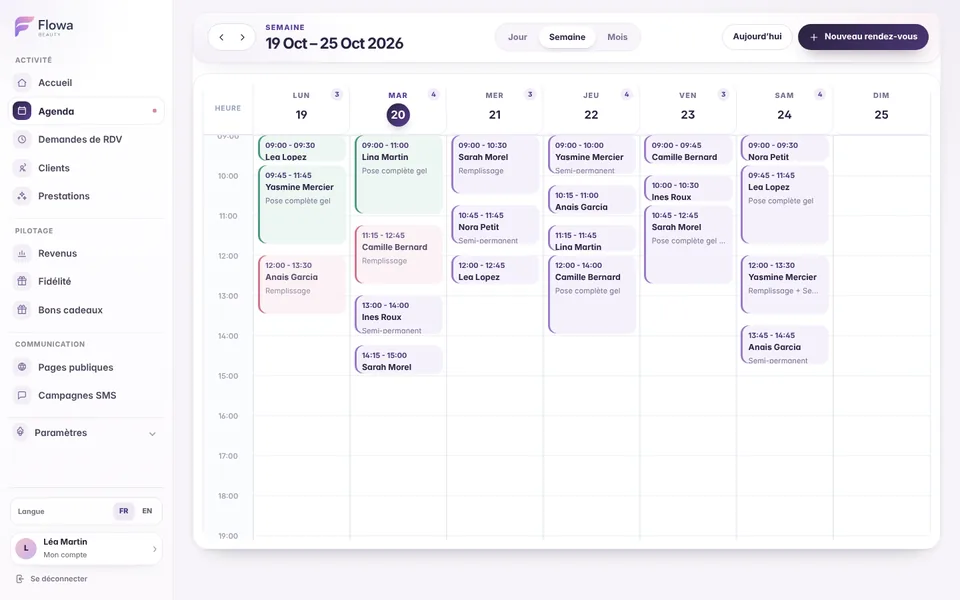
Each appointment brings together the client, services, options, times, internal notes and status. Day, week and month views let you move from immediate detail to a clear overview of your schedule.

  • Three complementary views

    Work day by day, scan the week or plan the month without losing the date you selected.

  • Complete status management

    Mark an appointment as scheduled, completed, cancelled or no-show, with confirmation before sensitive actions.

  • Adjustable final price

    When the service ends, enter the amount charged or apply a percentage discount or increase.

  • Editing and deletion

    Move, correct or delete a time slot; connected data, including the SMS reminder, follows automatically.

Flowa Beauty app screenshot: Calendar and appointments
03

Services, categories and options

Build a service menu that reflects how you work.

Flowa organises services into categories so your menu stays easy to manage as it grows. Each service can have its own duration, indicative price, colour and options that change the time or price.

  • Ordered categories

    Arrange treatments, sets or techniques in the order that suits your business.

  • Accurate durations

    Set a duration from 5 minutes upwards to reserve realistic time in the calendar.

  • Service options

    Add a variation with an extra charge, additional time or a shorter duration.

  • Controlled catalogue

    Duplicate a service, make it inactive or review which services contribute most to the business.

04

Client records and follow-up

Recover the full client context before they arrive.

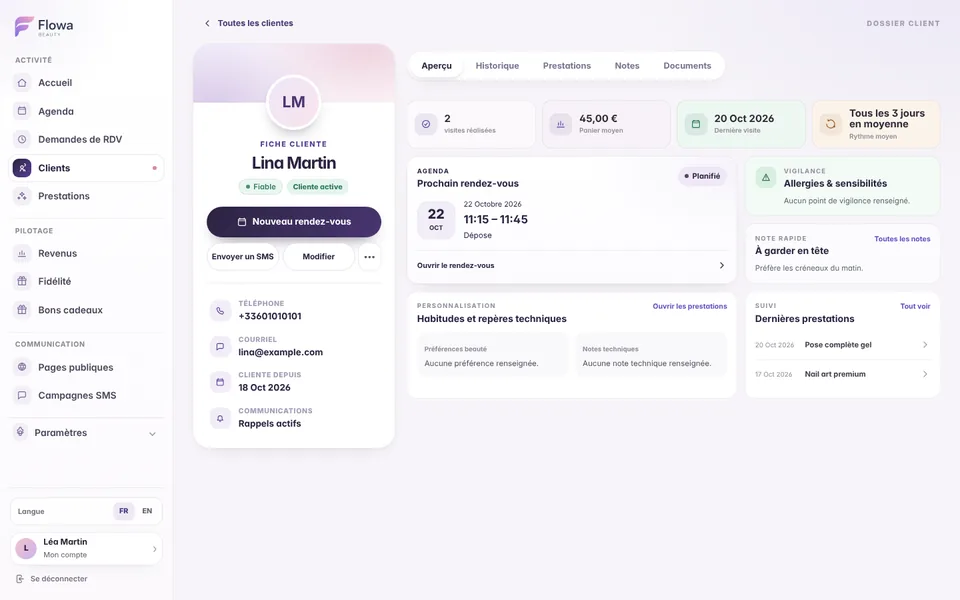
Each client profile centralises contact details, quick notes, beauty preferences, cautions and technical notes. It connects this information to appointment history, upcoming visits, spend and loyalty.

  • Chronological history

    Review previous services, amounts and upcoming appointments from the same page.

  • Client knowledge

    Keep preferences, allergies, cautions, technical details and quick notes in separate, clear fields.

  • Relationship insights

    See visit frequency, average spend, latest service and the level of no-show risk.

  • Controlled permissions

    Enable or disable SMS reminders and marketing communications for each client.

Flowa Beauty app screenshot: Client records and follow-up
05

Automatic SMS reminders

Reduce missed appointments without managing each message yourself.

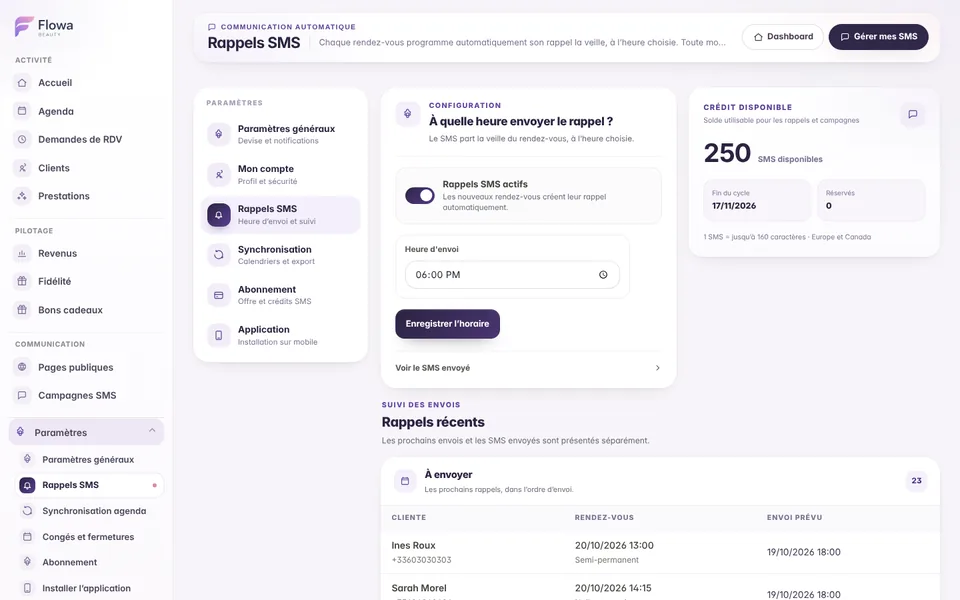
Choose the send time once. Flowa then creates the reminder from the appointment and schedules it for the previous day. A change of date, time, client or service updates the reminder automatically.

  • Automatic synchronisation

    Creating, editing, cancelling or deleting an appointment updates its connected reminder.

  • Duplicate protection

    Each appointment keeps one identified reminder and the send is claimed atomically before the SMS provider is contacted.

  • Clear tracking

    Separate reminders still due from those already sent and browse the history with pagination.

  • Tracked credits

    The SMS is charged when it is sent and the credit transaction remains connected to the operation.

Flowa Beauty app screenshot: Automatic SMS reminders
06

No-show deposits

Secure your time slots without chasing no-shows.

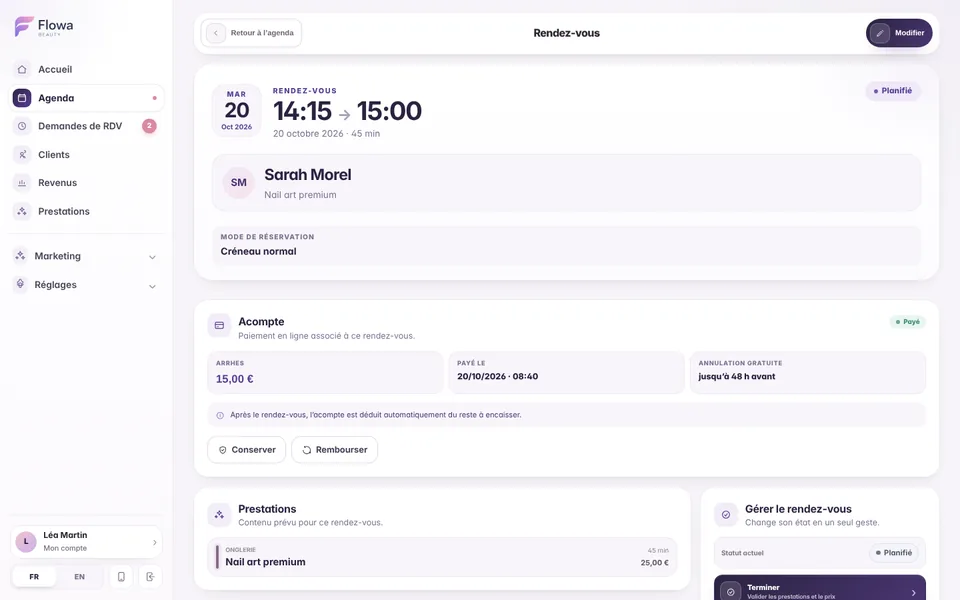
Connect your Stripe account, set a fixed amount or a percentage, then request the deposit in one click from an appointment or when approving an online request. The client pays by card on a secure page and the slot is confirmed as soon as she pays.

  • Money paid to you

    Deposits go straight to your Stripe account. Flowa takes no commission: only Stripe fees apply.

  • Send the link your way

    By email, by SMS or copied into WhatsApp and Instagram, with a payment deadline.

  • One simple rule

    The deposit is part of the appointment price paid in advance. Choose the free cancellation period and the text shown to the client before she pays.

  • Tracked to the end

    Full or partial refunds, deposits kept after a no-show and automatic deduction from the balance to collect.

Flowa Beauty app screenshot: No-show deposits
07

SMS marketing campaigns

Tell clients about a new service or an available time slot.

Create a message of up to 160 characters, preview the result and choose a straightforward audience: every eligible client or a precise selection. The campaign then goes through a review flow before sending.

  • Understandable audience

    Reach every opted-in client or select exactly the recipients you want.

  • Message preview

    Review the text and personalisation before requesting campaign approval.

  • Reserved SMS credit

    Required credits are reserved during approval, then adjusted to match the messages actually sent.

  • Statuses and traceability

    Track drafting, approval, sending, cancellation and the recorded campaign results.

08

Loyalty cards

Reward repeat visits with loyalty rules you control.

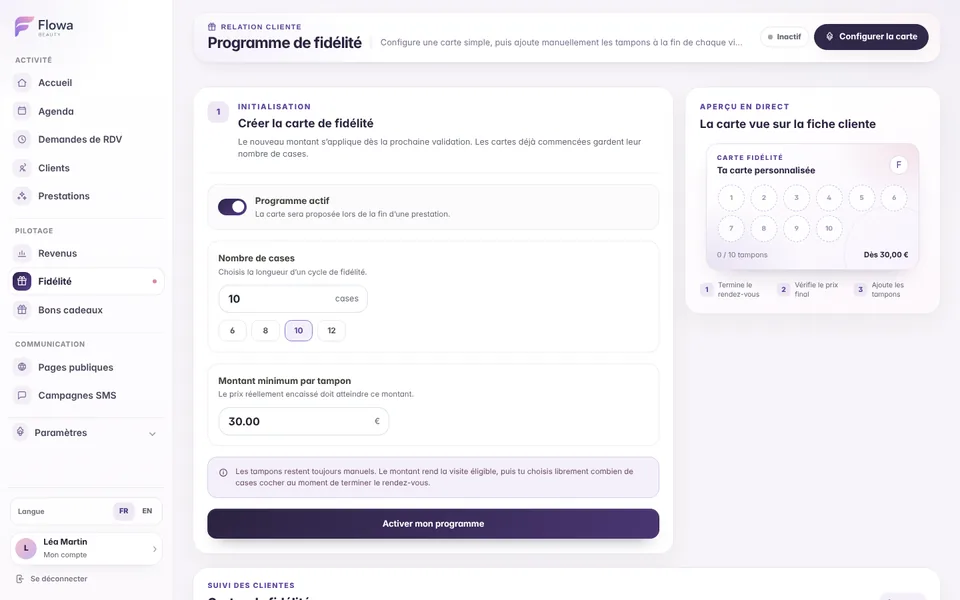
Set the number of spaces on the card and the minimum spend required for a stamp. After a service, choose how many stamps to add; corrections remain possible and reward handover is tracked.

  • Custom rules

    Choose the number of spaces and spending threshold that match your loyalty policy.

  • Manual, unlimited stamps

    Add as many stamps as needed when completing or editing an appointment.

  • Correctable history

    Review card activity and correct a stamp that was added by mistake.

  • Reward due

    A completed card remains visible on the dashboard and next appointment until the reward is handed over.

Flowa Beauty app screenshot: Loyalty cards
09

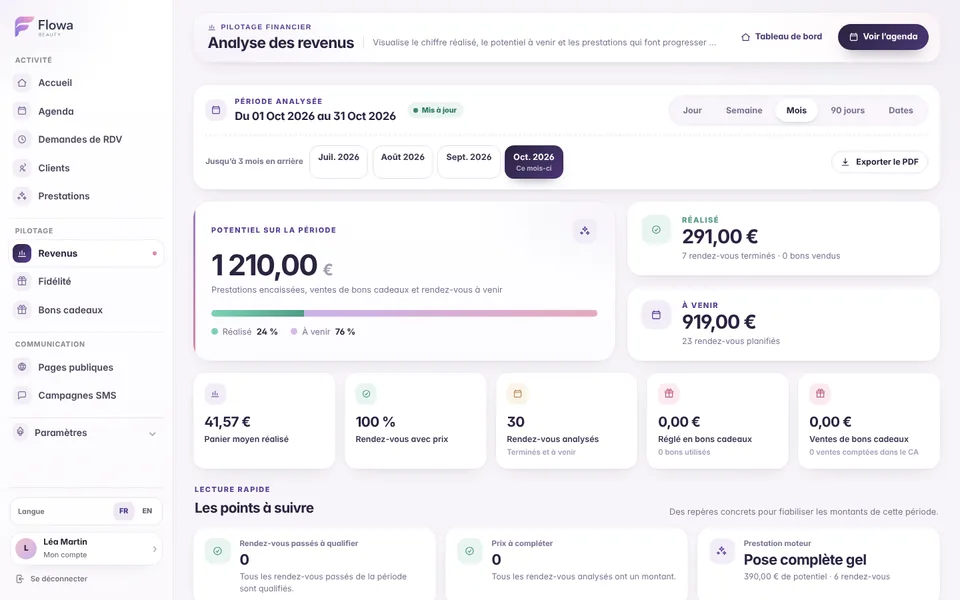
Revenue and financial insights

Understand what your schedule actually generates.

Financial insights are based on completed appointments and their final price. Compare recorded revenue with the value of upcoming appointments, then change period to review one day or a custom date range.

  • Flexible periods

    Move from the day view to preset periods or choose your own start and end dates.

  • Recorded and projected revenue

    Separate amounts already recorded from those expected from scheduled appointments.

  • Tracking quality

    Spot missing prices, appointments to review, cancellations and no-shows.

  • Business analysis

    Review average spend, top-performing services, leading clients and completion rates.

Flowa Beauty app screenshot: Revenue and financial insights
10

Custom mini-site

A mini-site in your style, ready to receive bookings.

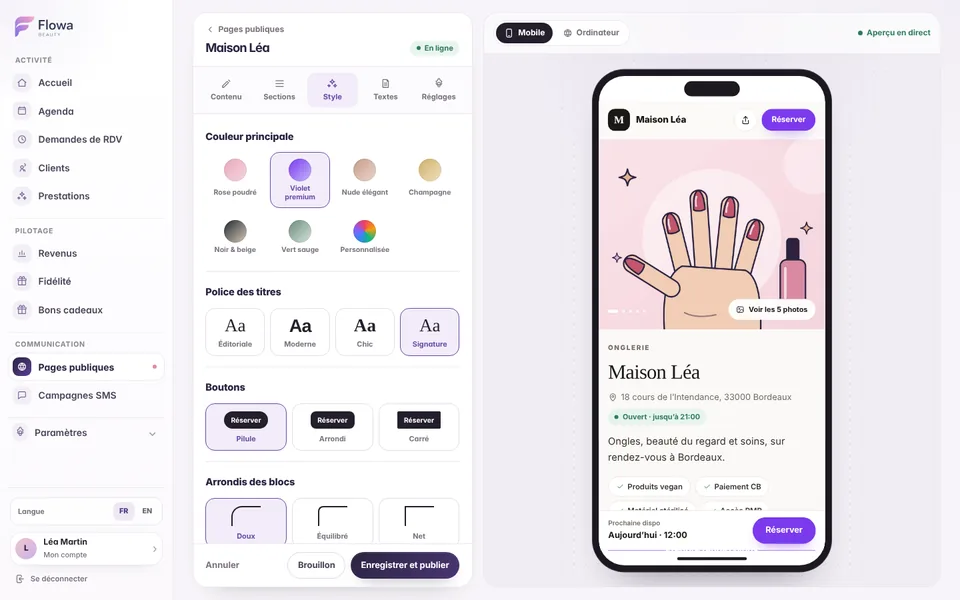
Create a mini-site to share on Instagram, in your bio or by message. Photo gallery, services, opening hours, address and next availability come together on an elegant page whose sections, colours, font and copy you choose with a live preview.

  • Tailored style

    Main colour, heading font, button shape, corners and page background: the page follows your brand.

  • Sections your way

    Show and reorder services, gallery, about, practical information, guarantees and final call to action.

  • Gallery and opening hours

    Up to eight photos of your work, your opening hours and the next available slot.

  • Live preview

    Every change appears instantly on phone and desktop before you publish.

Flowa Beauty app screenshot: Custom mini-site
11

Online appointment requests

Offer time slots without losing control of your calendar.

The public schedule calculates availability from existing appointments, open days, working hours and the total duration of the selected services. Each request remains pending until you decide.

  • Calculated availability

    Booked slots, existing requests and closure periods are removed automatically.

  • Multiple services per request

    The prospect selects up to eight services, then a date and a time calculated from their total duration.

  • Approval with a day overview

    Open the day schedule, keep the requested time or adjust it before accepting.

  • Approval with or without a deposit

    Simply confirm, or approve with a deposit request: the client receives a single email with the payment link. The normal SMS reminder stays connected to the appointment.

12

Leave and closure periods

Close specific dates without changing your usual working hours.

Record one day or a closure period with its reason. Those dates become unavailable in the shared schedule while your usual rules continue to apply to other weeks.

  • Custom periods

    Set a first and last day for leave, training or exceptional closures.

  • Automatic blocking

    No new public time slot is offered during a closed period.

  • Independent management

    Add, edit or delete a closure without rebuilding your showcase page.

  • Consistent schedule

    Public availability still reflects appointments and working hours outside the closure.

13

Competitions and promotional pages

Engage your community and collect real contacts.

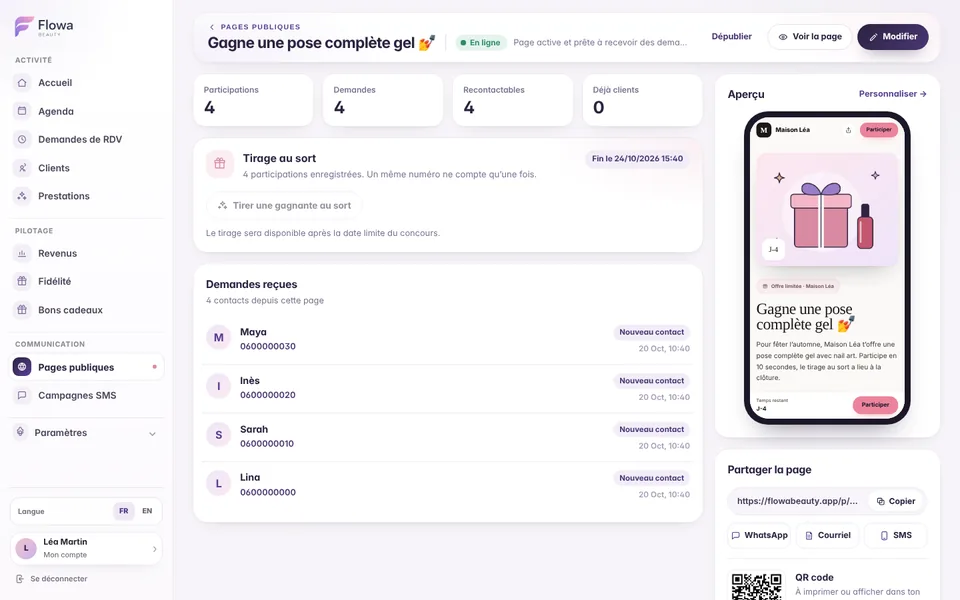
Create as many competition or promotional pages as needed with a start date, deadline, terms and visual. Entries are grouped in Flowa and a prize draw can select the winner.

  • Dated campaign

    Prepare the campaign in advance and let Flowa apply its availability dates.

  • Centralised entries

    Review contact details and the source of entries received through the public page.

  • Recorded prize draw

    Run the draw from the management workspace and keep the result connected to the page.

  • Controlled publishing

    Keep the page as a draft, publish it at the right time and close new entries after the draw.

Flowa Beauty app screenshot: Competitions and promotional pages
14

Calendar synchronisation

See Flowa appointments in your personal calendar.

Flowa provides a private iCalendar address in ICS format. Add it to a compatible tool such as Google Calendar, Apple Calendar or Outlook to view appointments from your Flowa calendar.

  • Private feed

    The address contains a token specific to your workspace and should not be published.

  • Complete events

    Appointment dates, times and useful information feed the subscribed calendar.

  • Continuous updates

    Compatible tools periodically read the feed again to retrieve changes.

  • Regenerable link

    Create a new address if the previous link was shared or needs to be revoked.

15

Mobile app and notifications

Keep Flowa close at hand on phone, tablet and computer.

Flowa runs in the browser and can be installed as a Progressive Web App on the home screen. The interface adapts to mobile and notifications can be enabled per device according to your preferences.

  • Installation without an app store

    Add Flowa to the home screen from a compatible browser and open it like an app.

  • Dedicated mobile navigation

    Quickly reach the dashboard, calendar, clients, services and other tools.

  • Notifications you choose

    Enable available categories, including the daily summary, upcoming appointment and low SMS credit alerts.

  • PWA updates

    The installed version checks for new files and offers or applies a refresh whenever possible.

16

Settings, SMS credit and subscription

Adapt Flowa to your business and stay in control of your plan.

Settings bring together business details, currency, notification preferences and useful access options. The Subscription page shows included SMS credit, top-ups and the current plan status.

  • Workspace currency

    Choose euros, Swiss francs, dollars or another available currency for displayed prices.

  • Detailed SMS balance

    Distinguish the monthly allowance, top-ups, reserved credit and the amount actually available.

  • Additional top-ups

    Purchase an SMS pack from the dedicated section when the allowance is no longer enough.

  • Subscription management

    Review the single plan and open the billing portal to manage payment or stop renewal.

Designed around your profession

See how Flowa fits into your profession.

The same tools adapt to different working patterns, service durations and client relationships.

View every profession-specific solution

Questions about Flowa features

What you need to know before choosing your software.

These answers explain how Flowa’s main tools work together in day-to-day use.

Ask another question
Can Flowa replace a traditional professional calendar?

Yes. Flowa provides day, week and month views, connects each appointment to a client and service, then uses that information for reminders, loyalty and financial tracking.

Do SMS reminders update automatically?

Yes. Creating or editing an appointment creates or recalculates its reminder. Cancelling or deleting the appointment prevents an obsolete reminder from being sent.

Is an online request added to the calendar immediately?

No. It remains pending. You can review the day, adjust the time and then approve or reject it. The appointment is only created after approval.

Can I request a deposit before an appointment?

Yes. Once your Stripe account is connected, request a deposit from an appointment or when approving an online request. The client pays by card, the slot is confirmed as soon as she pays and the deposit is deducted from the balance to collect. Flowa takes no commission.

How is revenue calculated?

Recorded revenue uses completed appointments and their final price. Projected revenue uses upcoming appointments with a known price. Cancellations and no-shows remain identifiable separately.

Can I use Flowa only on my phone?

Yes. The interface is responsive and the PWA can be added to your home screen. You can also access the same workspace from a tablet or computer.

Can the 250 monthly SMS messages be used for both reminders and campaigns?

Yes. The allowance is shared between automatic reminders and SMS campaigns. Your balance and reserved credit remain visible from the Subscription page.

One simple plan

All these features in one workspace.

The calendar, client records, reminders, loyalty, public pages and business insights are all included in the Flowa Beauty subscription.

  • 14 days free, no payment card
  • €29.90 a month, every feature included
  • 250 SMS included every month
  • No commission on your appointments

Nothing is charged when the trial ends.